If you have more than one package you want to create in the Knowledge Base, you are able to use a specific template in which you can
state which packages should be created via a template that you may download in we:kb. By filling out the individual fields for each of the
packages you would like to create and by uploading the template afterwards, all the packages mentioned in your template will be created
automatically.
NOTE: It is also possible to create a single title for each of your packages. Please note the fields publication_title, publication_type, title_id
and title_url (see explanation below).
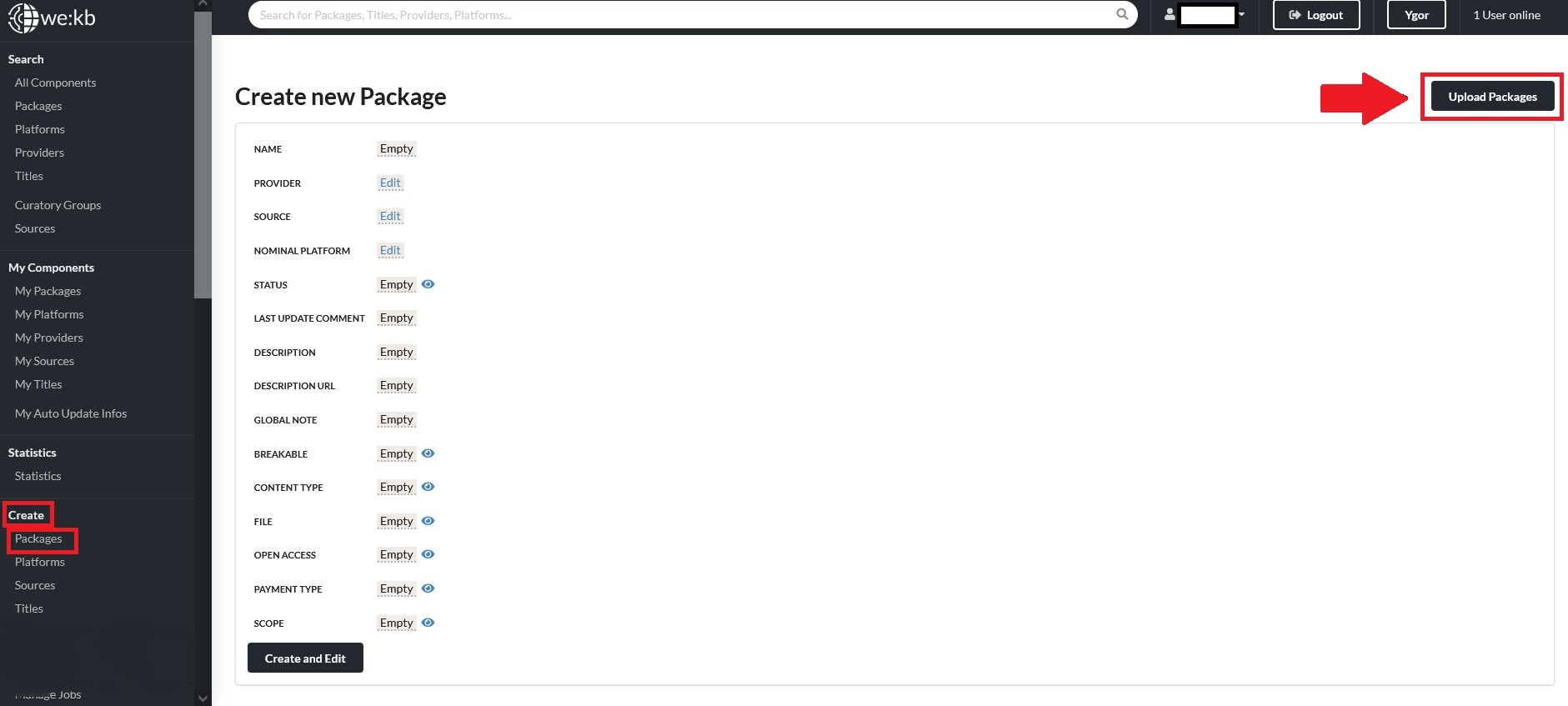
Click on Create – Packages and und Upload Packages in the upper right corner:
Now you are able to download the package template that you can then use to fill out for your own packages:

Fill out the fields within the template to the best of your ability – the more information you already fill in, the less manual labour you will have after the packages have been created. A definition of all the template fields can be viewed on the Package batch processing page but a more detailed description will be given here:
General package information
package_name: choose names for all those packages you would like to create via the template
provider_uuid: copy in the UUID of your own Organisation (or of the Organisation you want to name as the provider of the package). You can find the UUID in the Organization record in we:kb when you scroll down right to the end of the record:
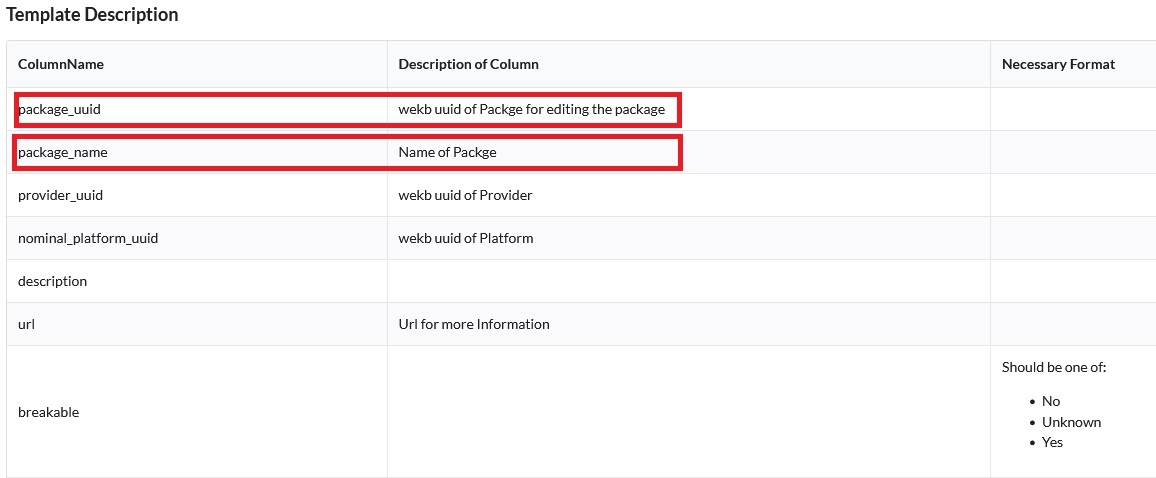
nominal_platform_uuid: copy the UUI from the Platform record in we:kb to connect the package you want to create with the corresponding platform. You will find the UUID of the platform by also scrolling down to the end of the platform record of the platform you want to add to the package
description: (s. page 6)
url: (s. page 6)
breakable: (s. page 6)
content_type: (s. page 6)
file: (s. page 6)
open_access: (s. page 6)
payment_type: (s. page 7)
scope: (s. page 7)
national_range: if you chose National in the field Scope you can choose which specific country the package can be purchased in. The codes used for the National Ranges are according to DIN 2335 (e.g. Germany = GER; England = ENG; …) https://www.zeitschriftendatenbank.de/fileadmin/user_upload/ZDB/pdf/ggr/G_251_Sprachenliste_nach_Sprachbezeichnungen.pdf (s. page 7)
regional_range: if you chose GER (Germany) in the National Range, you can also add a specific region within Germany: Baden-Wurttemberg, Bavaria, Berlin, Brandenburg, Bremen, Hamburg, Hesse, Lower Saxony, Mecklenburg-West Pomerania, North Rhine-Westphalia, Rhineland-Palatinate, Saarland, Saxony, Saxony-Anhalt, Schleswig-Holstein, Thuringia
anbieter_produkt_id: unique identifier for your package (s. page 7)
ddc: (s. page 7)
Source information
If you want to set up an automated title import/update for the packages you want to create, use the fields below:
source_default_supply_method: do you use a http(s) supply method or an ftp-server for your KBART files?
source_url: to automatically create a source, enter the stable URL from which the KBART file for the respective package can be retrieved (see p. 13).
source_ftp_server_url: if you want to set up an automation via an ftp-server
source_ftp_directory: if you want to set up an automation via an ftp-server
source_ftp_file_name: relevant name of the file on your ftp-server
source_ftp_username: not visible to users outside of your Curatory Group
source_ftp_password: not visible to users outside of your Curatory Group
frequency: frequency at which your KBART file is updated: Daily, Monthly, Quarterly, Weekly or Yearly
automated_updates: choose Yes if you want to trigger the Automation that will keep the titles within your package up to date via your KBART
Single title information
If you do not have a KBART file for the packages you want to create, you may create a single title for each of your packages:
publication_title: fill in the name of the title you want to create for each of your packages (mandatory field if you want to create a single title for your package)
publication_type: specify whether you want to create a monograph (for an e-Book), serial (for an e-Journal), database or other (for resources not fitting any of
these types) / (not mandatory for single title creation)
title_id: an internation identifier for the single title/resource you want to create (not mandatory for single title creation)
title_url: add the URL leading to the single title/resource you want to create (mandatory for single title creation)
Save the template you filled out with all the relevant information (tsv, UTF-8 coded) and click on Durchsuchen and Upload to create the packages.
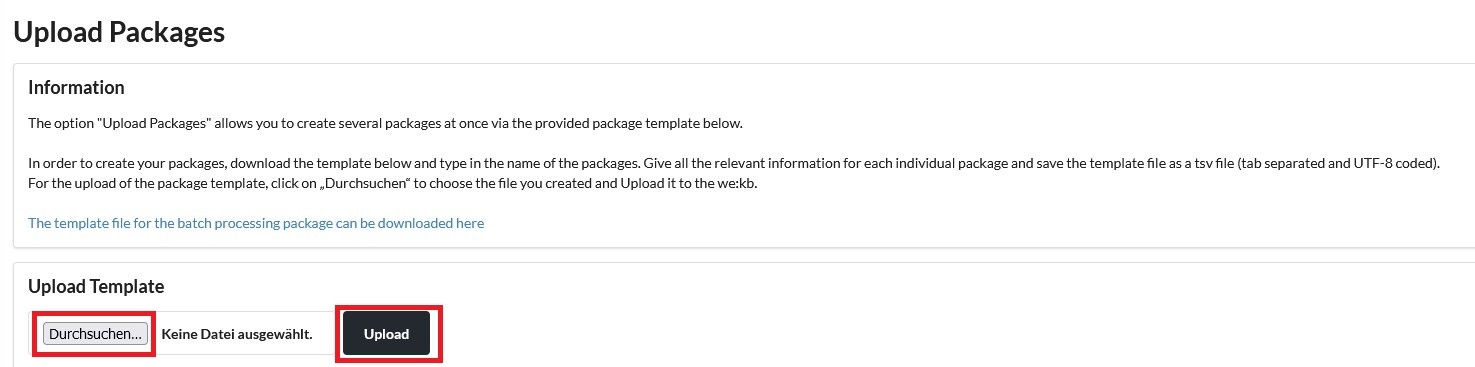
Your packages will now be created. If you have packages for which you added a source_url and selected Yes for automated_updates, the titles from your KBART file will be uploaded to the package during the night.