You have created a KBART file (more information regarding the KBART format can be found here KBART/we:kb technical requirements) with all the relevant fields from the standard as well as the expanded fields? You have set up a stable URL under which this exact file can be accessed/downloaded? Then you can use this URL in order to set up a Source in which this URL is integrated and which can be connected to your package afterwards.
If you store the files on your server with a current timestamp in the format "_YYYY-MM-DD", you can append the current date (of the time of entry) to the URL field (i.e., [ProviderName]_[Region/Consortium]_[PackageName]_[YYYY-MM-DD].txt).
For subsequent retrievals of the KBART file we:kb will then automatically find the latest version of the KBART file.
Click on Create – Sources and fill in the fields
we:kb Shortcode (may be the abbreviated code of the source name) and
Source Name (may be the name of the package for which the source is created) .
Click on Create and Edit
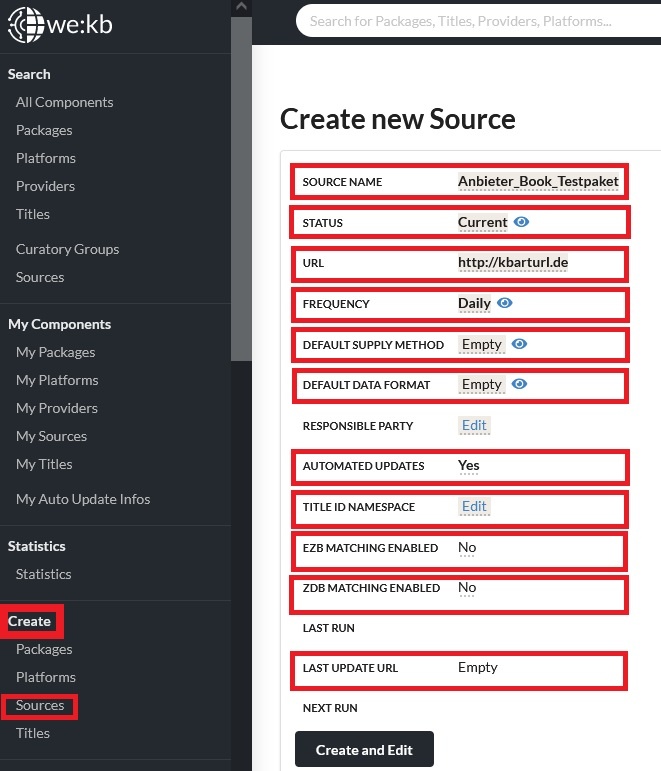
You may afterwards edit the follow fields:
Status: Current
URL: add the stable URL via which the KBART can be accessed
Frequency: indicator when the system should check for new titles/adjustments within your KBART
Default Supply Method: HTTP Url
Default Data Format: KBART
Automated Updates: Yes
Titel ID Namespace: choose the namespace for your title ID (already given under your Organization) so that your internal IDs for each title (title_id from the KBART file) can be connected with you as a provider
With creating the Source automatically your own Curatory Group will be added.
Now your Package is connected to the Source (= your stable URL leading to your KBART/we:kb file), so that all adjustments within your file are automatically imported into your Package.